[Example] Use WorkBuddy to Auto-Organize Daily AI News
Scene Description
AI news updates fast; the same event often appears across many media and sources. Browsing each site one by one is time-consuming and easy to miss model releases, product updates, open-source projects and industry shifts.
This case suits product, R&D, operations, investment and content teams that need to keep watching the AI industry. We want to turn "hunting news everywhere" into a repeatable WorkBuddy task.
The Task to Complete
Once done, WorkBuddy should be able to:
- Query AI-industry dynamics within a given time range.
- Filter content by company, model, product or topic.
- Keep title, summary, publish time and source link for each item.
- Turn a large batch of candidate info into a more readable hotspot report.
- Focus on directions like large models, products, open-source projects or papers per the task.
What the AIHot Skill Can Do
AIHot is an information-type Skill for AI dynamics, suited to querying and organizing recent content on models, products, industry, papers and open-source projects. It can be a ready-made information source for WorkBuddy, returning relevant news and original links per your task description.
| Use | Example task | Suited for |
|---|---|---|
| Company-dynamics tracking | What did OpenAI release in the last 7 days | Product, R&D, investment |
| Daily hotspot organizing | Summarize today's AI large-model hotspots | AI team, content team |
| Topic retrieval | Find multimodal-model dynamics from the last week | Research, product planning |
| Source backfill | Keep the original report link for each conclusion | Readers needing further verification |
AIHot provides and retrieves candidate news; what's worth focusing on, how to categorize and what format to output are decided by the task description you write for WorkBuddy.
Prep Before Install
- WorkBuddy is usable normally.
- WorkBuddy can access external web pages.
- AIHot Skill address:
https://aihot.virxact.com/aihot-skill/
AIHot comes from an external address. Before installing, review the source domain and Skill content, and let WorkBuddy run a safety check first. Don't install Skills of unknown origin, with abnormal permission requests or suspicious scripts.
Install the AIHot Skill in WorkBuddy
Open a new WorkBuddy task and enter:
Install this skill for me: https://aihot.virxact.com/aihot-skill/WorkBuddy first fetches the Skill content and runs the Skill safety-check flow. After confirming the source, permissions and what will be executed have no anomalies, it continues installing.
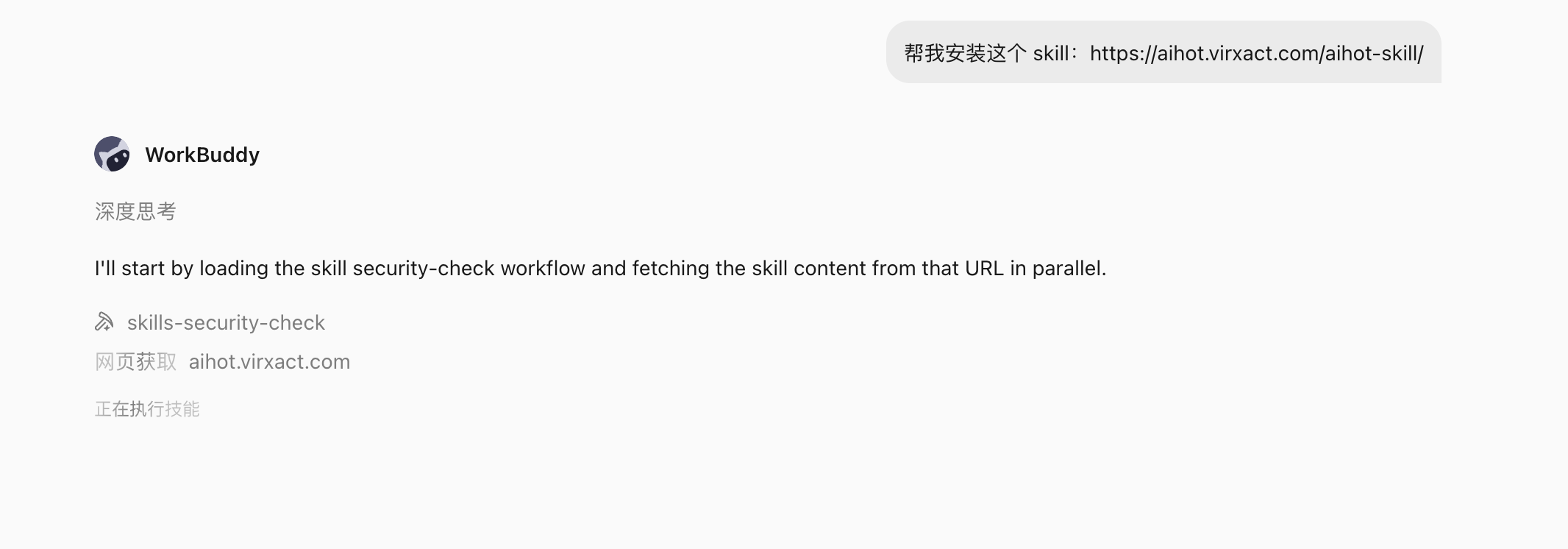
After install, you can continue asking:
Tell me where the AIHot Skill was installed, what tasks it can do, and whether it needs extra accounts or permissions to call.This step helps confirm the Skill is actually usable, not just that the install task finished.
Task 1: Query Recent OpenAI Dynamics
The simplest task description:
Take a look at what new things OpenAI released recently.For more stable, verifiable results, write more explicitly:
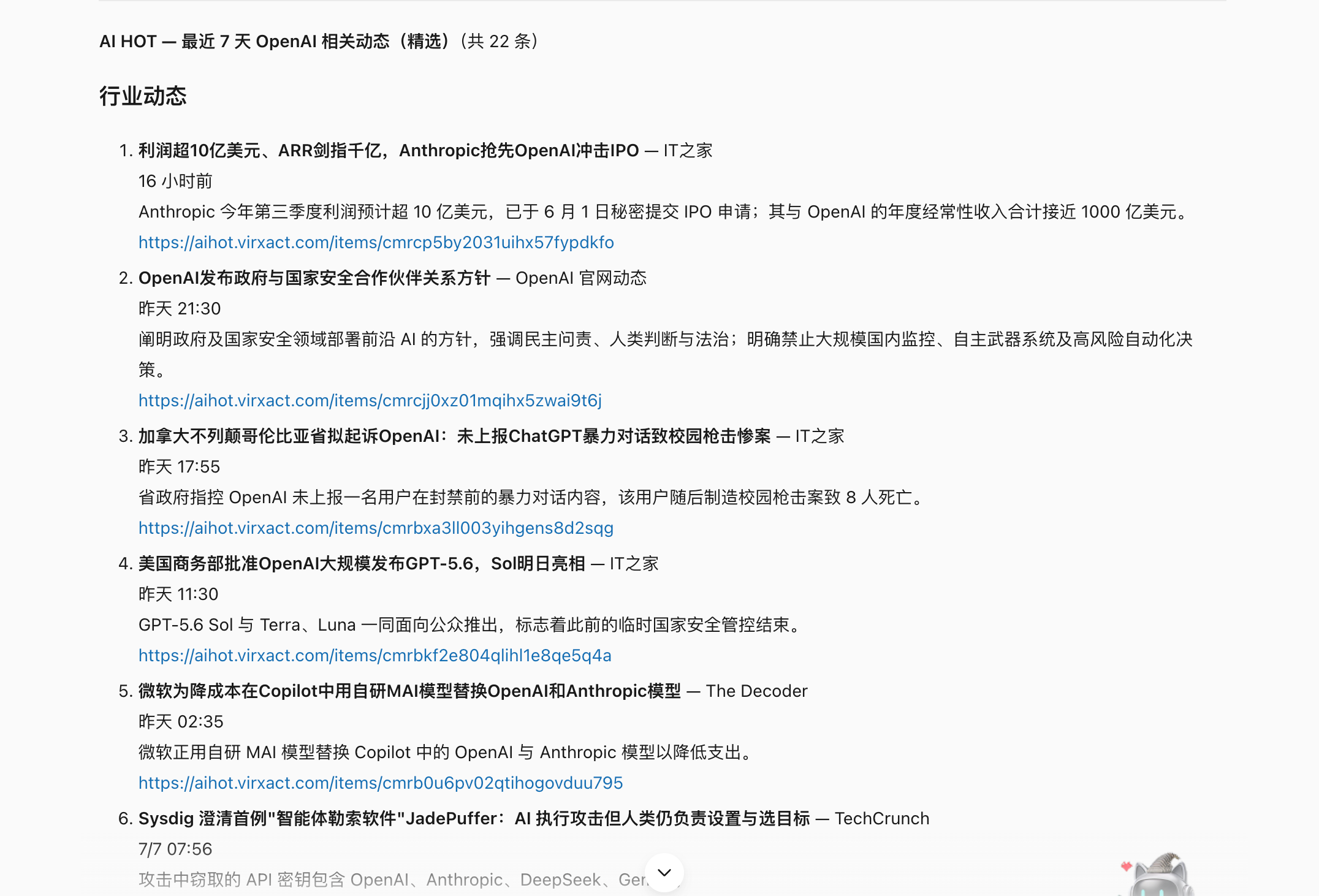
Use the AIHot Skill to query dynamics related to OpenAI in the last 7 days.

Requirements:
1. Prioritize OpenAI official releases, model & product updates, API changes and major industry dynamics;
2. Merge obviously duplicate same-event items;
3. Each item includes title, publish time, a two-sentence summary and the original source link;
4. Categorize by "official dynamics, products & models, industry impact";
5. Clearly mark uncertain info; don't write conclusions without source support.
After running, WorkBuddy returned the last 7 days of OpenAI-related content, keeping title, time, summary and the AIHot original link for each item:
Task 2: Generate Today's AI Large-Model Hotspot Summary
For a more daily-report-like result, enter:
Use the AIHot Skill to summarize today's AI hotspot news, focusing on the AI large-model direction.

Output by this structure:
1. Today's hottest: list the 3 dynamics most worth attention;
2. New large-model releases: organize models, products and open-source projects worth attention in the last 7 days;
3. Each includes a one-sentence summary, why it's worth attention and the source link;
4. Merge duplicate reports and note how many sources are reporting the same event;
5. End with one sentence summarizing today's large-model industry mainline.
The actual result was organized by hotspot and large-model direction, kept specific source links, and gave a one-sentence conclusion:

How to Write a Better Task Description
A stable AIHot task description should make at least four things clear:
| Element | Example wording |
|---|---|
| Time range | Today, last 24 hours, last 7 days |
| Focus topic | OpenAI, large models, multimodal, AI Agent, open-source projects |
| Filter criteria | Keep only major updates, merge duplicate events, prefer official sources |
| Output format | Title, summary, time, impact judgment, source link |
If you only say "summarize AI news", WorkBuddy can still run, but the count, scope and format of the result won't be stable enough. The more explicit the task description, the more reusable and acceptable the output.
Final Effect
Via the AIHot Skill, WorkBuddy turned scattered AI news into two directly readable results:
- A recent-dynamics list around a specific company or topic.
- A filtered, categorized and deduped AI hotspot summary.
Each item keeps a source link, so readers can keep opening the original to verify — not just rely on the model-generated summary.
Acceptance Criteria
- The AIHot Skill is installed and can be called in new tasks.
- Query results match the time range and topic specified by the task.
- Each important item keeps a source link that's still accessible.
- The same event isn't presented as multiple headline items.
- The summary doesn't add numbers and conclusions the source can't support.
- The hotspot report's categorization matches the task description.
FAQ
AIHot isn't called after install
Write "use the AIHot Skill" explicitly in the task, and have WorkBuddy state which Skill it actually called. If still unavailable, check whether the Skill installed successfully and whether the current workspace can see it.
Too much info returned
Shorten the time range, limit to a company or topic, and explicitly keep only the 5–8 most important items.
The result looks like a plain summary
Require keeping publish time, source name and original link, and explicitly write the categorization, dedupe and impact-judgment rules.
Safety and Limits
- AIHot is a news source; it doesn't mean all content has been fact-checked.
- For important conclusions, keep opening the original link and prefer verifying official sources.
- News content changes over time; the same task yields different results on different dates.
- Check source, permissions and script content before installing an external Skill.
- Don't use unverified hotspot summaries directly for official external publishing.
How to Reuse
Swap the topic in the task to quickly get news reports in different directions, e.g.:
Use the AIHot Skill to query AI Agent-related dynamics in the last 7 days, focusing on new products, open-source frameworks and enterprise-adoption cases. Keep a source link for each, and summarize 3 directions worth the team continuing to study.You can also, after confirming a single task is stable, combine it with WorkBuddy automation to set the same prompt as a daily or weekly repeat. Automation is a later extension; this case first ensures AIHot's install, call and output can run independently.