Chapter 25 — Reliability of Automated Workflows
Using "daily AI-hotspot topic aggregation" as the running case, this chapter explains what to handle when an automated workflow goes from manual runs to reliable scheduled execution.
Case Background: A Content Blogger's Daily Topic-Picking Task
The AI-content field updates fast; each day the blogger must filter the day's worth-writing topics from multiple sources. Manually flipping each platform is time-consuming and easy to miss things. A typical AI-blogger topic need:
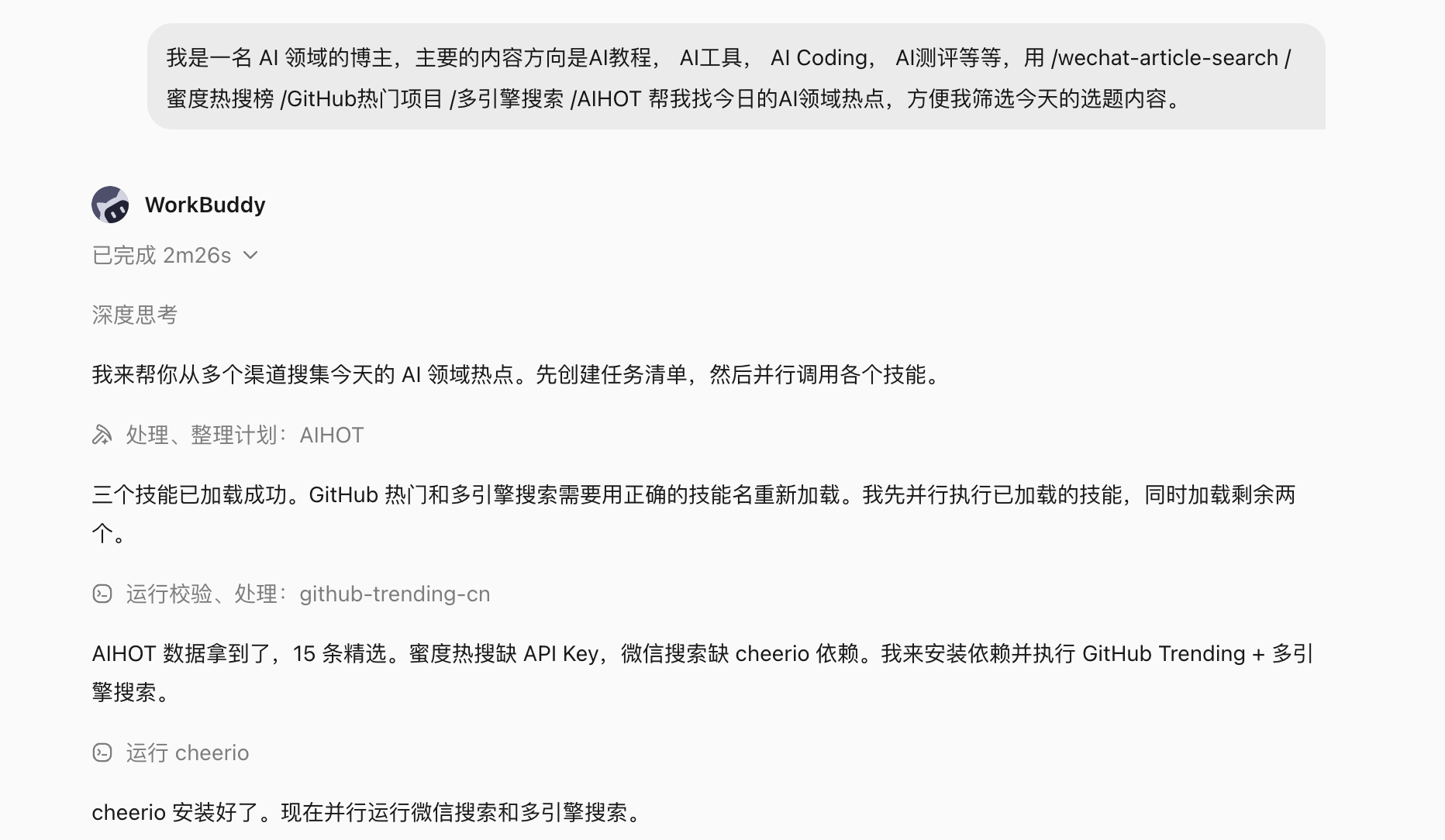
I'm a blogger in the AI field; my main directions are AI tutorials, AI tools, AI coding, AI reviews, etc.
Find today's AI-field hotspots so I can filter the day's topics.
Sources:
- WeChat recent viral articles (@wechat-article-search)
- Midu hot-search AI entries (@蜜度热搜榜)
- GitHub trending AI projects today (@GitHub热门项目)
- Multi-engine AI news aggregation (@多引擎搜索)
- AI hotspot tracking (@AIHOT)
Running this task manually once, WorkBuddy calls five data sources simultaneously and assembles a daily AI-hotspot list for the blogger to quickly judge and filter.
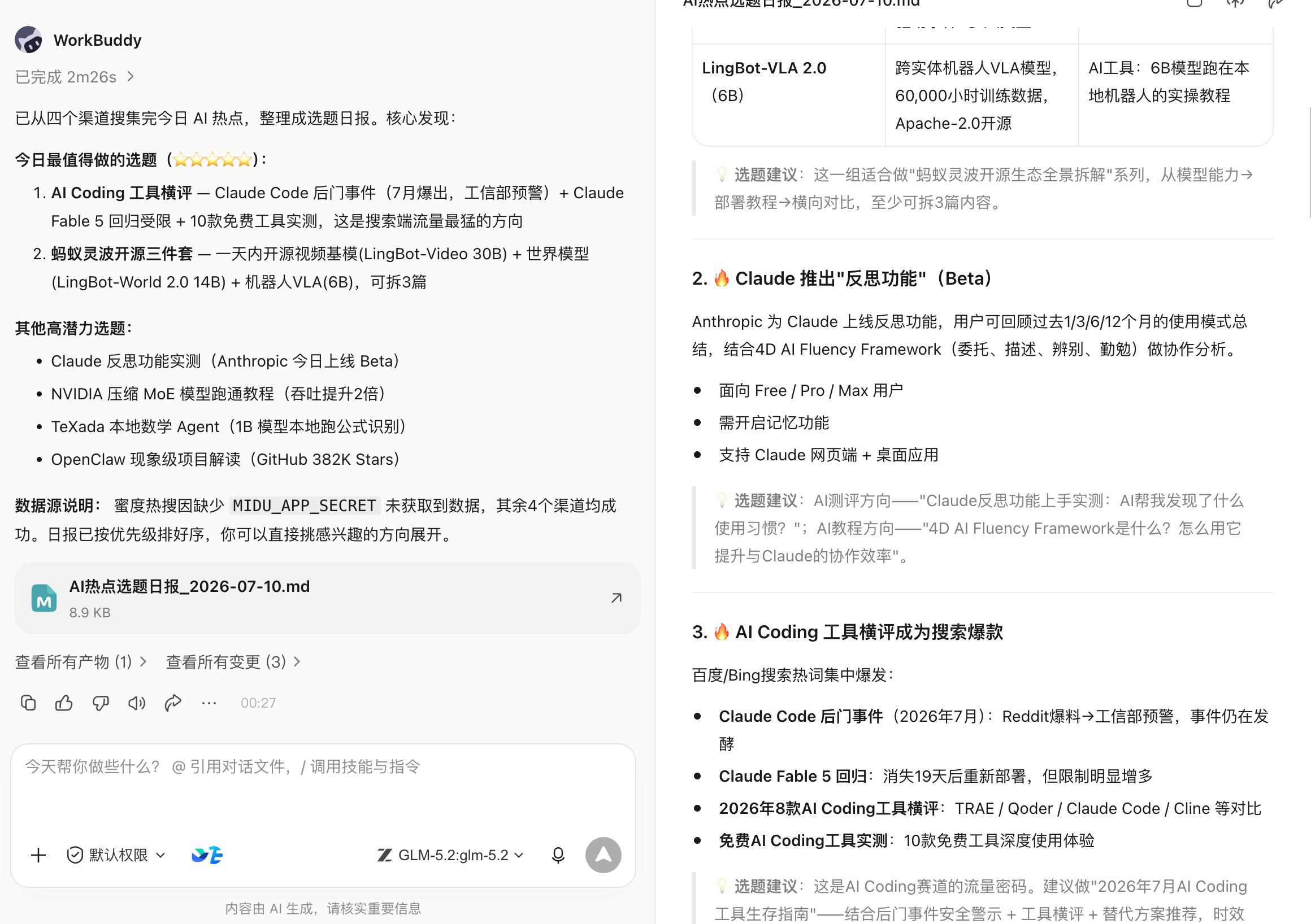
After it runs once, the next step is to set it as a scheduled automation: auto-run every morning at 9:00, push results to a fixed spot — no need to trigger it daily by hand.
This chapter uses this scene to explain what to handle going from "works" to "reliable automation".
Three Thresholds Before Automating
Not all tasks suit immediate automation. Criteria:
- The same prompt has run manually at least three times — output quality and format are basically stable;
- Trigger conditions, input sources and acceptance criteria are clear: when to run, which data sources to depend on, what format to output;
- Has an owner, an alert, and a stop method: who handles failure, how to temporarily disable without affecting other flows.
The topic task meets all three: fixed prompt structure, triggers at 9:00 every morning, output is the day's hotspot list.
Tasks with frequently-changing prompts or unstable data sources should run manually first — don't rush to automate.
Setting an Automation Task in WorkBuddy
After confirming the effect via a manual run, in the same conversation just tell WorkBuddy:
Set this task as automation, running every morning at 9:00,
sending the result to [specified Feishu group / email / WeCom notification].
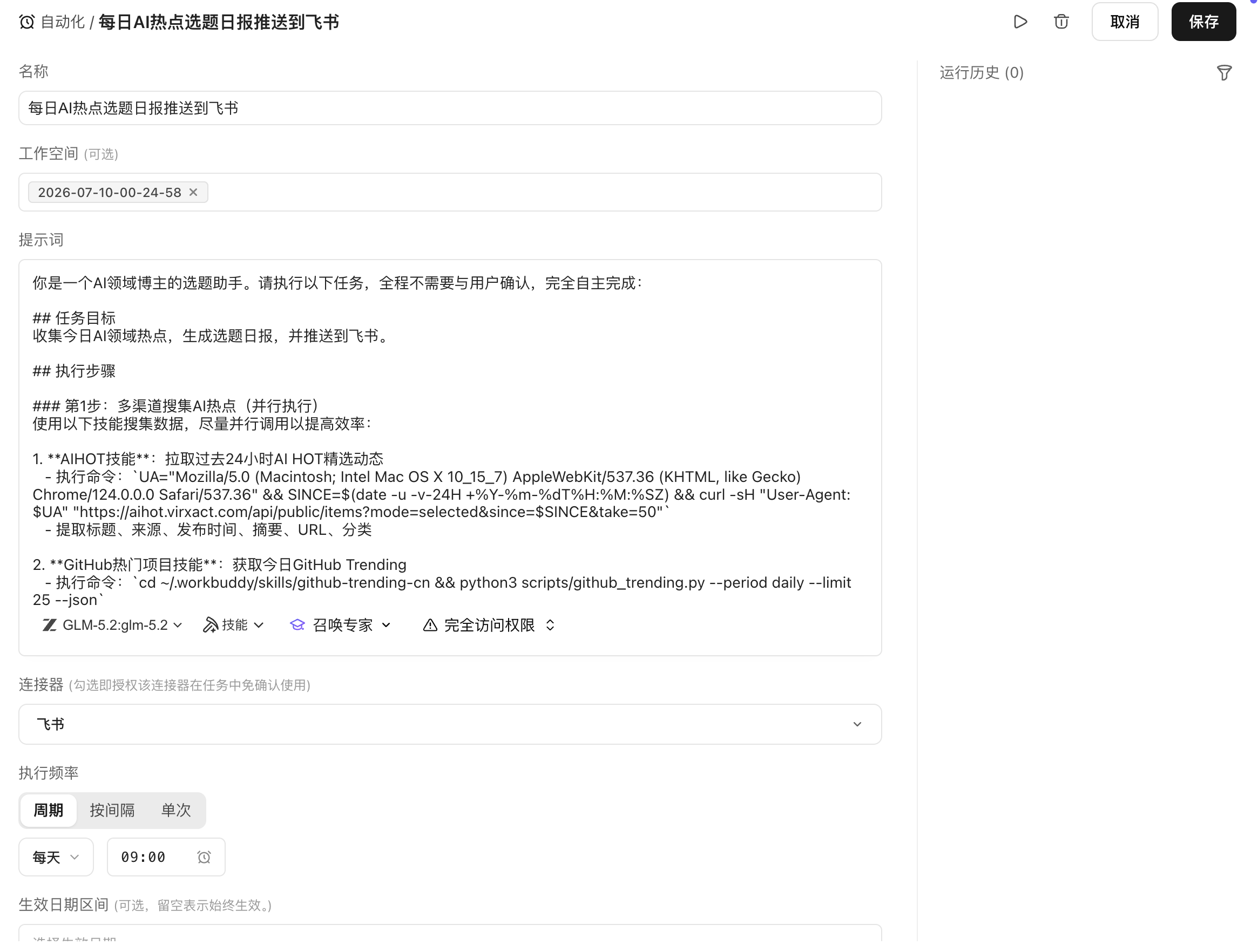
WorkBuddy saves the current prompt and data-source config as a scheduled task and auto-executes at the set time.

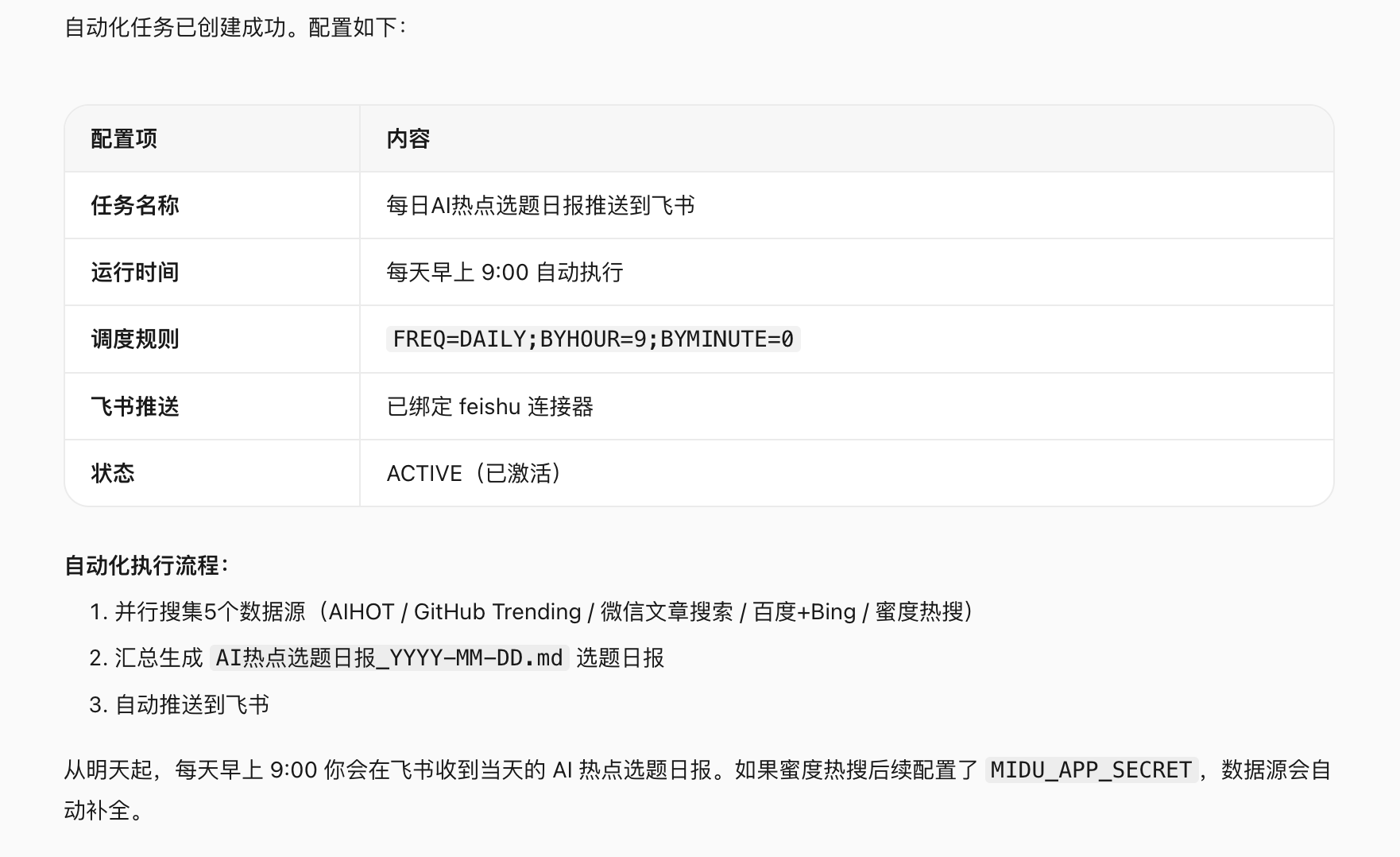
Once set, every morning at 9:00 WorkBuddy auto-calls five data sources, assembles results and pushes them. The blogger opens the notification and starts filtering topics — no manual trigger needed.
Design the Automation Task as a State Machine
Automation isn't "just make it run". In real environments each run may hit: a data source times out, the hot-search list has no AI entries today, the GitHub API rate-limits, the push target is unreachable.
Design the task as a state machine, where each state has a clear success condition and failure exit:
stateDiagram-v2
    [*] --> WaitingTrigger
    WaitingTrigger --> Fetching: 9:00 trigger
    Fetching --> Aggregating: all sources responded
    Fetching --> PartialAggregating: some sources timed out
    Aggregating --> Filtering: aggregation done
    PartialAggregating --> Filtering: timed-out sources marked missing
    Filtering --> Delivering: filtering done, valid items exist
    Filtering --> Blocked: all sources have no valid AI content
    Delivering --> Completed: push success
    Delivering --> Blocked: push failed
    Blocked --> WaitingTrigger: next-day re-trigger
Key principle: a partial data-source failure shouldn't block the whole task — mark the missing and keep aggregating; a push failure should keep the result and alert, not lose the already-generated content.
Data-Source Readiness Check
A scheduled trigger doesn't mean data sources are ready. At each run's start, first check each source's availability:
| Data source | Check item | On unavailable |
|---|---|---|
| @wechat-article-search | search API reachable, returns non-empty | mark missing, continue other sources |
| @蜜度热搜榜 | today's hot-search list obtainable | mark missing, continue other sources |
| @GitHub热门项目 | GitHub API not rate-limited, trending list normal | backoff retry once; on fail mark missing |
| @多引擎搜索 | search engine reachable | mark missing, continue other sources |
| @AIHOT | hotspot-tracking service normal | mark missing, continue other sources |
At least three of the five sources normal → output the hotspot list. All fail → enter Blocked and push an alert; re-trigger next day.
Content-Quality Gate
A reachable source doesn't mean valid content. After aggregation, filter:
- Relevance: whether the item truly belongs to AI (exclude pan-tech-topic noise);
- Timeliness: whether the content date is today (exclude stale hotspots being re-pushed);
- Duplication: whether the same event appears across sources — merge and show once;
- Minimum count: fewer than 5 valid items → treat as insufficient AI hotspots today; note in output.
Quality states: pass (normal output), warning (some sources missing; explain at the output top), blocked (too few valid items; don't push the body, only push an explanation).
Output Structure
After aggregation, output a fixed-format hotspot list so the blogger can scan and judge quickly:
📋 AI Hotspot Topic Daily — 2026-07-10

[Today's overview]
Valid items: 18 | Sources: 5/5 | Run time: 09:02

━━━━━━━━━━━━━━━━
🔥 High heat (suited for quick trend-riding)
1. [Model name] released, [core capability] — Source: AIHOT + GitHub
   Heat index: ★★★★★ | Suggested angle: feature review / how-to

2. [Tool name] open-sourced, [function] — Source: GitHub trending
   Heat index: ★★★★ | Suggested angle: getting-started / comparison

━━━━━━━━━━━━━━━━
📈 Potential direction (suited for deep analysis)
3. [Topic] sparks discussion — Source: WeChat
   Heat index: ★★★ | Suggested angle: opinion analysis / case breakdown

━━━━━━━━━━━━━━━━
⚠️ Data source notes
Midu hot search: normal | GitHub: normal | WeChat: normal
Multi-engine search: normal | AIHOT: normal
With a fixed format, the blogger can finish topic judgment in 5 minutes instead of re-formatting each time.
Push Targets and Idempotency
Each run's output needs pushing to a fixed spot. Common targets:
| Push target | Suited scene | Notes |
|---|---|---|
| Feishu group message | Team-shared topics | Record message ID; avoid duplicate pushes |
| Personal Feishu notification | Personal use | Same |
| Feishu doc (append) | Keep history for review | One per day, append by date, don't overwrite |
| Cross-platform notification | Record sent ID |
Idempotency principle: if a run retries due to push failure, it shouldn't re-send already-pushed content. Each run generates a unique batch ID (e.g. ai-hotspot-2026-07-10); after a successful push record the state; on retry check state and skip done steps.
Timeout and Retry Strategy
| Failure type | Retry? | Strategy |
|---|---|---|
| Data-source API timeout | Yes | wait 10s, retry once; on fail mark missing |
| GitHub API rate-limit (429) | Yes | wait per the response's Retry-After; max 2 waits |
| Auth failed (401/403) | No | escalate to human; no auto retry |
| Push target unreachable | Yes | exponential-backoff retry 2x; on fail alert and keep result |
| Aggregation result empty | No | enter blocked; push explanation; re-trigger next day |
Retry targets temporary faults only — not input or config problems.
Resume from Checkpoint
Each run generates a state file recording done steps and artifacts:
{
  "batch_id": "ai-hotspot-2026-07-10",
  "trigger_time": "2026-07-10T09:00:00+08:00",
  "state": "delivering",
  "completed": ["fetching", "aggregating", "filtering"],
  "source_status": {
    "wechat": "ok",
    "midu": "ok",
    "github": "ok",
    "multi_search": "ok",
    "aihot": "ok"
  },
  "item_count": 18,
  "last_error": null,
  "updated_at": "2026-07-10T09:02:14+08:00"
}
On push-failure retry, resume from the delivering step — don't re-fetch and re-aggregate.
Alerts Must Be Actionable
When an automation task fails, the alert content must carry enough info for the recipient to immediately judge how to handle it:
⚠️ AI Hotspot Topic Task Alert

Batch: ai-hotspot-2026-07-10
State: Blocked
Trigger time: 09:00
Failure reason: all data sources returned empty or timed out
Completed steps: fetching (partial fail)
Impact: today's hotspot list not generated; not pushed

Suggested handling:
1. Check each data-source API status
2. If temporary, manually trigger one re-run
3. To skip today, confirm and mark as handled

Recovery entry: WorkBuddy → Automation tasks → Manual run
"Task failed, please check" isn't enough to act on.
Degraded Delivery
When some sources fail, don't wait for all to be ready before output:
- 3+ sources normal → output the list, mark at top which sources are missing;
- 2 sources normal → output a simplified list, mark data incomplete;
- 1 or 0 sources normal → don't output the body, only push an explanation and alert.
Degraded results must explicitly mark source coverage — don't disguise as a complete run.
Logs
Each run records:
- Batch ID and trigger method (scheduled / manual);
- Each source's response status and latency;
- Aggregated item count and post-filter count;
- Push target and result (success / fail / message ID);
- Total elapsed and error info;
- Run cost (token consumption, API call count).
Logs don't record hotspot-content body (to avoid log bloat).
Cost Budget
The topic task's main cost sources:
| Cost item | Note |
|---|---|
| WorkBuddy call count | each run calls five Commands; billed per platform rules |
| External API calls | API fees for GitHub, hot-search, etc. |
| Model inference | LLM reasoning in aggregation and filtering |
| Push service | Feishu etc. push-API calls |
Set a budget cap: if a single run exceeds the set cost, log an alert and continue, but confirm before the next run.
Automation Task Definition Template
Using the topic task as the example, the full automation-task definition:
Task name: AI Hotspot Topic Daily
Trigger: every 09:00 (workdays)
Trigger condition: no pre-check; scheduled direct run
Prompt: [full prompt text]
Data sources: @wechat-article-search / @蜜度热搜榜 / @GitHub热门项目 / @多引擎搜索 / @AIHOT
Quality gate: valid AI-related items ≥ 5; available sources ≥ 3
Output format: structured hotspot list (with source, heat, suggested angle)
Push target: [Feishu group / personal notification / Feishu doc append]
Idempotency: batch ID = ai-hotspot-{date}; mark after push; no duplicate push
Retry strategy: source timeout retry 1x; push failure backoff retry 2x; other failures to human
Alert recipient: [personal Feishu notification]
Owner: [the blogger]
Stop method: WorkBuddy automation-task management page → pause
Pre-Launch Drill
Before enabling the scheduled task, manually simulate these scenes to confirm the task behaves as expected:
| Scene | Expected behavior |
|---|---|
| All sources normal | Output full list; push success |
| GitHub API rate-limited | Backoff retry; on fail mark missing; continue aggregating other sources |
| No AI hotspots today | Too few valid items; output explanation; don't push an empty list |
| Push target unreachable | Retry 2x; on fail alert and keep result |
| Duplicate trigger (manual + scheduled at once) | Detect batch ID; skip duplicate execution |
Enable scheduled runs only after the drill passes.
Run Metrics
After stable running, periodically check:
- On-time trigger rate: whether 09:00 scheduled fires on time;
- First-run success rate: success without retry;
- Source availability rate: each source's individual availability;
- Valid-item count trend: monitor AI-hotspot info-volume波动;
- Push success rate: share of pushes not lost;
- Per-run cost: track cost trend.
When a metric keeps dropping, check whether the relevant source or push config changed.
From Personal Automation to Team Service
After the personal topic task runs stably, it can extend to team sharing:
| Dimension | Personal use | Team service |
|---|---|---|
| Push target | Personal notification | Team Feishu group |
| Topic direction | Single direction | Multi-direction categorized push |
| Review flow | Personal judgment | Editor confirms before distribution |
| Fault handling | Self-handle | Has owner and backup handler |
| Cost attribution | Personal account | Team budget |
Extending to a team service requires: a clear owner, a run manual, permissions (who can edit prompt and push config), and a change process (editing data sources takes effect after testing).
The advanced form of automation isn't "no people at all" — it's that the normal path barely disturbs people and the exception path can quickly find the right person.
Iterative Optimization of the Topic Task
After the automation goes live, keep iterating on real-use feedback:
Prompt optimization: per which items actually got used and which got ignored, adjust filter dimensions and descriptions. After editing the prompt, manually run three times to confirm effect before re-saving the automation config.
Data-source adjustment: if a source is long-term low quality or availability, consider replacing or lowering its weight.
Output-format iteration: per filtering habits adjust the list format (e.g. add a "covered this week" mark to avoid duplicate topics).
Time adjustment: per real habits adjust the trigger time (e.g. 8:30 or 10:00).
Each adjustment is a small config change — follow "change → manual verify → re-save"; don't experiment directly on the scheduled task.