Chapter 12 — Start With Small Things Like Desktop File Tidying
Tidy Desktop Invoices — Stop Digging Through Files at the Computer
Desktop invoices are a classic "the computer is absorbing the mess for a human" scene: e-invoices, screenshots, PDFs, WeChat-downloaded files, email attachments all mixed together, named every which way. When you're away from the computer, the annoying part isn't "I don't know how to reimburse" — it's "I don't know which invoices are already on the computer, which fields are missing, which files might be duplicates".
Scene Pain
- Invoices scatter across the desktop, Downloads, the WeChat file folder; formats may be PDF, JPG, PNG.
- File names are often just "发票.pdf", "image.png", "微信图片_2026xxxx.jpg".
- What reimbursement really needs is structured fields: title, tax ID, amount, invoice date, invoice number, seller.
- Remote batch tidying most fears deleting, overwriting, or moving originals — then you can't find them later.
text
Help me tidy the invoices on my computer — but don't delete, move or overwrite originals.
Scan scope: desktop, Downloads and the WeChat received-files folder, last 30 days only.
Candidate condition: filename contains "发票", "电子发票", "invoice", or the content is recognized as an invoice (PDF, JPG, PNG).
Step 1: return the candidate list and count first.
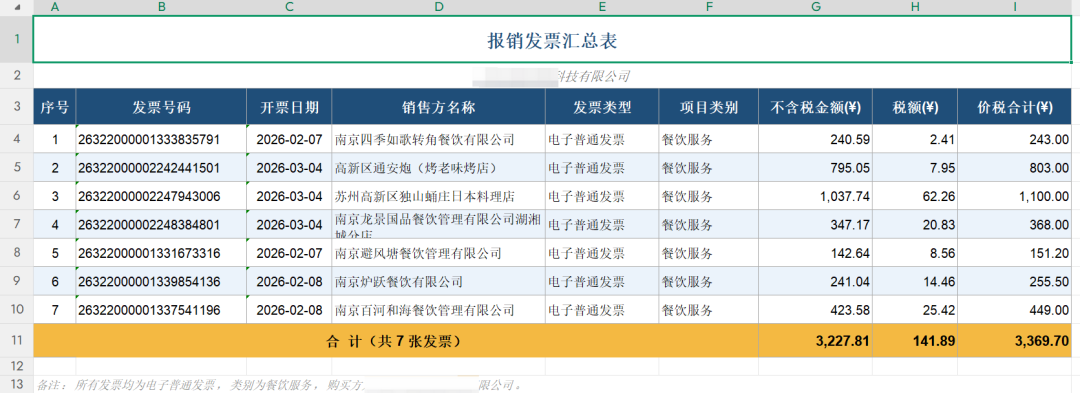
Step 2: recognize title, tax ID, amount, invoice date, invoice number, seller, file path.
Step 3: generate invoice-ledger.xlsx, and list a human-confirmation list of "duplicate invoices" and "fields not recognized".
After running, only a new ledger file is added — desktop originals aren't moved, renamed or deleted.